Showing posts with label suggested. Show all posts

Thursday, May 15, 2008

Contest Suggestion: 31 Days of the Dragon

'lo. After a long time I am posting some thing here for you guys. I hope until now you have enjoyed the existing set of Blogger mods that I had published. While this is not related to blogger mods, I am sure those of you who were unaware, will definitely love it. The other day I came across a big contest while browsing some of sites I read regularly, and simply could not resist sharing it with you.

HP (in association with Buzz Corps)is promoting its latest 20.1" notebook i.e. The HP HDX Entertainment Notebook using a contest called "The 31 Days of Dragon". Before I proceed further note that this contest is open to everyone from any part of the world.

Contest Info: There are 31 participating web sites, with the sponsorship of HP where HP is working with them to offer 31 prize packages - one a day for 31 days during a period from 09 May through 08 June 2008. Here are the details of the price package (which btw is worth well over USD 5000 in retail value):
  • Display: 20.1″ diagonal WUXGA High-Definition HP Ultra Brightview Widescreen (1920×1200)
  • Operating system: Windows Vista Ultimate (64-bit)
  • Processor: Intel Core2 Extreme Processor X9000 (2.80GHz, 6MB L2 Cache, 800MHz FSB)
  • Memory: 4GB DDR2 System Memory (2 Dimm)
  • Graphics Card: 512MB NVIDIA GeForce 8800M GTS
  • Personalization: HP Imprint Finish (Dragon) + Fingerprint Reader + Webcam + Microphone
  • Networking: Intel(R) PRO/Wireless 4965AGN Network Connection and Bluetooth(TM)
  • Hard Drive: 500GB 5400RPM SATA Dual Hard Drive (250GB x 2)
  • Optical: Blu-Ray ROM with SuperMulti DVD+/-R/RW Double Layer
  • TV & Entertainment Experience: Integrated HP HDTV Hybrid TV Tuner and 4 Altec Lansing speakers + the HP Triple Bass Reflex subwoofer
  • Primary Battery: 9 Cell Lithium Ion Battery
  • Productivity Applications: Microsoft Office 2007, Corel PaintShop Pro Photo X2, Corel Painter 4, Ulead VideoStudio 11.5 Plus
  • Games: Viva Pinata, Microsoft Flight Simulator X, Microsoft Flight Simulator X Acceleration Expansion Pack, Gear of War
  • Blu-Ray movies: The Pirates of the Caribbean Trilogy – The Curse of the Black Pearl, Dead Man's Chest, At World's End.
And here is a list of websites that are running/will run a seven day contest between the following dates (begin - end):

13 May - 20 May www.geekstogo.com
14 May - 21 May bink.nu

15 May - 22 May www.mediablab.com
16 May - 23 May www.last100.com

17 May - 24 May www.labnol.org
18 May - 25 May www.notebooks.com
19 May - 26 May www.slashdotreview.com
20 May - 27 May www.neowin.net
21 May - 28 May www.geek.com
22 May - 29 Mau www.lockergnome.com

23 May - 30 May www.planetx64.com
24 May - 31 May www.thegreenbutton.com
25 May - 01 Jun www.istartedsomething.com
26 May - 02 Jun www.bleepingcomputer.com
27 May - 03 Jun www.hardwaregeeks.com
28 May - 04 Jun www.geeknewscentral.com

29 May - 05 Jun www.geekzone.co.nz
30 May - 06 Jun www.thetabletpc.net
31 May - 07 Jun www.gearlive.com
01 Jun - 08 Jun www.gottabemobile.com

Some of the website site where the winners have already been declared are:

02 May - 09 May www.absolutevista.com
03 May - 10 May www.arstechnica.com
04 May - 11 May www.osnn.net
05 May - 12 May www.jkontherun.com
06 May - 13 May digitalmediaphile.wordpress.com

07 May - 14 May www.bostonpocketpc.com
08 May - 15 May www.the-gadgeteer.com
09 May - 16 May www.thedigitallifestyle.com

10 May - 17 May www.digitalhomethoughts.com
11 May - 18 May www.windows-now.com
12 May - 19 May www.windowsconnected.com


So I suggest you to head over to these website and track them to win the super prize package. For details about the contest please visit here
. There is an RSS link and an OPML available so that you can track these sites conveniently.

In addition, most of these site have very good articles which techies and computer enthusiasts will definitely like. So go now and start participating, I am also competing :)
Tuesday, November 21, 2006

Cool Technorati Add-ons for your Blog

Hello Readers,

I have come across two cool add-ons for your blog. They are:

1. Technorati Rank display widget by purplemoggy
2. Technorati Blog reactions link from imessengr.com

1. PurpleMoggy has posted a very useful add-on with which one can display their real-time Technorati rank in the blog's sidebar. To get a preview of the add-on and learn the code click here.

2. Deniz from imessengr.com has provided the Blogger Beta code for displaying the number of links from other blogs to a particular post via Technorati's engine. To get a preview of this add-on and learn the code click here.

Friday, November 17, 2006

New hacked template for Blogger beta and return of "flag-blog"

Dears readers,

The topics covered in this post are:

1. A hacked sand-dollar template (with widebar) for blogger beta by imessengr.com
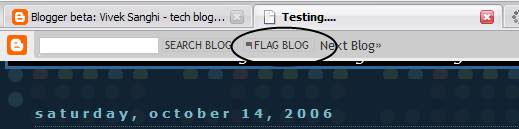
2. "Flag blog" option now available for Blogger beta blogs.

1. Hacked Sand Dollar Template

Deniz from imessengr.com (the one who presented the recent referrers hack for blogger beta) has released a hacked sand dollar template for blogger beta. This template contains a variety of hacks and is based on the widebar design I had discussed earlier in my posts. You can preview this template from here and view this post to learn more and download the template.

2. "Flag Blog" option now available for Blogger beta blogs.


I just noticed that the "flag blog" or "flag this" button on the navbar which was available only for the classic Blogger blogs in now available for Blogger Beta blogs as well. With this, blogger has brought yet another feature of Blogger v2.0 into beta i.e. v3.0.

Monday, November 13, 2006

Feed, Social Bookmark Drop-down and a Recent referrers hack

Hello Readers,

In this post, I have presented the following add-on for Blogger-Beta:

1. Subscribe drop-down (on-hover) for presenting feed subscription options.
2. Social Bookmark drop-down for Blogger-beta post footers.
3. Extreme Socializer – A Social Bookmarking alternative.
4. Recent Referrers hack by web-messenger.

1. Feed Subscribe Drop-down (on-hover)

You might have noticed the Javascript-based subscribe drop-down (activates on mouse hover) in my blog’s widebar. I had got this one from here. Just go to this link, follow the instructions there in, incorporate the code in a widget and say good-bye to that long list of chicklets occupying your sidebar and also present your reader with a large number of subscription options.

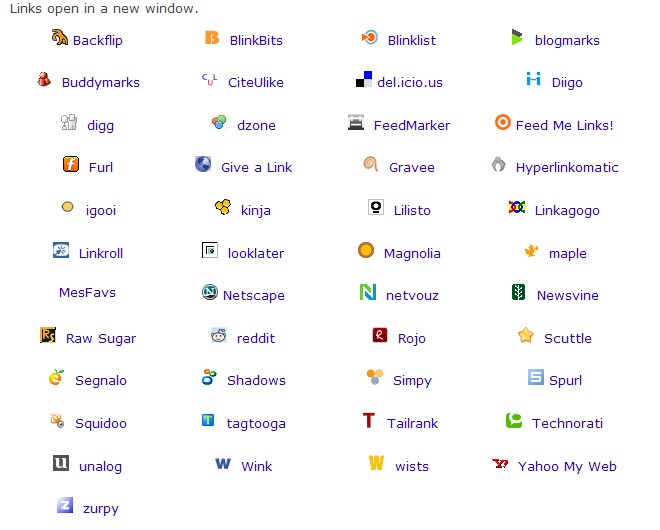
2. Social Bookmark Drop-down

From the same site I also found a tool to create a Social Bookmark drop-down menu (regular type). As this tool cannot create the links for Blogger beta post footers, I have modified their code and put it up for ready use (Thanks to Ramani for the help). You can download the text file containing this code from here. Simply download the text file and copy-paste the code directly into the post-footer portion of your template. See this add-on in action, here.(To learn how to work with post-footers in blogger beta, click here)

The advantage of this system is that you can give your readers the option of choosing from a large number of social bookmarking services without:

1. Sacrificing much space in your post footers.
2. Taking pains to host the social bookmarking icons (images) and then linking to them in your code.
3. Increasing your blog loading time by having a lot of images in the post footer.

In addition, inspite of the large list of bookmarking services in this drop-down, your readers should be able to locate a service (of their choice) easily as the list is in an alphabetical order. If you want to add more services to this drop-down you can look-up for them here and for an exhaustive list, go here (you may need to modify to code for blogger beta).

3. Social Bookmarking alternatives

Another good alternative to present a large number of bookmarking options to your readers without much trouble, is to use Extreme Socializer. Once a reader clicks on the Extreme Socializer icon, they are taken to the Extreme Socializer website where they can choose from a large number of bookmarking services.


Here is the code to be used in post-footers, if you want to use this service:

<a expr:href='"http://ekstreme.com/socializer/?url=" + data:post.url + "&amp;title=" + data:post.title' target='_blank' title='Bookmark anywhere with Extreme Socializer'><img alt='Socialize' border='0' src='[Your image source]'/></a>

You can pick the image for this one from blog’s my post-footer, but please host it on your own :)

Added on Nov 29, 2006: Deniz from imessengr.com has found another good service that offers a range of bookmarking, feed/podcast aggregating options. Please visit his blog to learn about the service and get the code for your blogs.

4. Recent referrers hack

Deniz from web-messengers has presented a hack on how to show a list of recent referrers to your post. You can check-out this hack from here.

Sunday, November 12, 2006

A Firefox extension and PurpleMoggy's hacks

Hello readers,

I have been using a Firefox extension by name fasterfox. If slow browsing speed has been a problem for you, I recommend that you give it a shot.

Coming to beta hack, this blog now uses two hacks which I picked up from PurpleMoggy's blog. It appears that a tutorial has been put up for the search box. Please find the tutorial on implementing a 4-in-1 search box (like I have) here.

The second hack I found in PurpleMoggy is a javascript based peek-a-boo system for linklists in sidebar. This is almost same as Blogger University's expand-collapse menu. Just that the hack I am using was picked-up by PurpleMoggy from here and modified using CSS such that it blended very well with my template as well.

Wednesday, November 01, 2006

Auto-hide blogger navbar like Windows taskbar

Hello Friends,

Avatar from Bloggeratto has put up a comprehensive post on how to get your blogger navbar to auto-hide like the Microsoft Windows taskbar. This means that after using the code from his post you can make the blogger navbar hidden and it appears only when one hovers the mouse cursor over the navbar section.

To view what I am talking about, just view Bloggeratto in Firefox and check out the navbar section. See how the navbar appears when you bring the mouse cursor near it and auto-hides when the mouse cursor is taken away. You can learn this hack on Bloggeratto from here.

Friday, October 06, 2006

Blogger template anatomy (non-beta bloggers)

Hello readers,

I was browsing through instabloke and in it I came across a link which contains a very good explanation of a non beta blogger template. If one wishes to learn blog hacking, one must know thy template well. I recommend you go through this article to learn more.

The writer(s) have actually use a picture of a sample blog and provided each section of the blog with its relevant CSS and HTML code. In addition, I also like their blog's design and certain page elements. Good work done by the author(s)!

Wednesday, September 27, 2006

Cluster maps finally

Yesterday, I was finally able to secure a clustermaps account for this blog. The registration service was blocked for a long time and I did not know any one who would invite me. However, they have reopened the registrations for now and those who wish to use this service, your time is now.

Clustermaps is a free online service that allows a website/blog to display the locations in the world from where its visitors hail. It is very popular and a cool service in my opinion. If you have a reasonable reader base, why not show-off :)). This service is a purely cosmetic add-on if you use Google Analytics to track your website traffic.

I do not recommend using this service if most of your website’s readers are from one small region or if your website is heavily loaded with scripts/flash as this thing will affect the page-load time of your site by a pretty good number.

Friday, September 22, 2006

Rake in feeds with blogger beta and OPML (updated)

I am not sure about classic blogger, but I can definitely tell about blogger beta, that it has a number of options to choose from as far as feeds are concerned. If you have the right idea, you can use all of these feeds to offer your readers the flexibility to choose what they wish to read and how.

Full posts feed of your blog:
http://[your blog].blogspot.com/feeds/posts/full (updated as per blogger buzz)

Summary posts feed of your blog:
http://[your blog].blogspot.com/feeds/posts/summary (updated as per blogger buzz)

Full post feed for a label (topic):
http://beta.blogger.com/feeds/[blog id]/posts/full/-/[label name]

Summary feed for a label (topic):
http://beta.blogger.com/feeds/[blog id]/posts/summary/-/[label name]
(or)
http://[Your Blog].blogspot.com/feeds/posts/default/-/[label name] (updated as per Phydeaus3)

Full comments feed:
http://beta.blogger.com/feeds/[blog id]/comments/full
(or)
http://[your blog].blogspot.com/feeds/comments/full (added as per blogger buzz)

Summary of Comments feed:
http://beta.blogger.com/feeds/[blog id]/comments/summary
(or)
http://[your blog].blogspot.com/feeds/comments/summary (added as per blogger buzz)

Phew! Did I miss some thing? With so many feeds to play, you can offer your readers with tremendous flexibility in choosing what they want to read and how. Realizing the benefits of this (especially in my blog where there are a many topics(labels)), I have revamped my feed subscribe section in the side bar. Using drop-down menus, I have tried to ensure that the readers get to choose what they want.

I picked up the code for the drop-downs from an article in Improbulus’s “A consuming experience”. However, the code for the drop-downs required some modification (I guess due to the differences between beta blogger and classic blogger). Here’s how a typical drop-down code looks:

<select id="feedURLs" onchange="var feedURL=this.options[this.selectedIndex].value;var feedTxt=this.options[this.selectedIndex].text;showFeed(feedURL,feedTxt)">
<option selected="selected" value="clear" >Select Full or Shorter Feed</option>
<option value="FULLFEEDURL">Full Site Feed</option>
<option value="EXCERPTSFEEDURL">Excerpt Site Feed</option>
<option value="HEADLINESURL">Headlines only Site Feed</option>
</select><br/>

Here is the modified version of this code that works with blogger beta:

<select id="feedURLs" onchange="var feedURL=this.options[this.selectedIndex].value;var feedTxt=this.options[this.selectedIndex].text;showFeed(feedURL,feedTxt)">
<option selected="selected" value="clear" />Select Full or Shorter Feed
<option value="FULLFEEDURL"/>Full Site Feed
<option value="EXCERPTSFEEDURL"/>Excerpt Site Feed
<option value="HEADLINESURL"/>Headlines only Site Feed
</select><br/>

Basically the </option> tag is eliminated to get this thing working here. I dressed up all the essential feeds of my blog using FeedBurner and then used them in the drop-downs. Feedburner also lets you create the OPML file for all the feeds that you have burned using it. Once you have the OPML file, upload it somewhere and provide a direct link to your readers so that they may download and incorporate it in their feed reader. To learn about OPML click here. To find out your blog id in beta, just scroll to the bottom of your blog and hover the mouse cursor on the link which reads "posts(atom)". The number after "feeds/" is your blog id.

Another update: If you wish to post HTML code in your blog you can use this tool to encode HTML code such that it can be displayed just the way it should appear to a reader. I had found this link in John’s FreshBlog.

Wednesday, September 20, 2006

Label feeds and peek-a-boo for sidebar (blogger beta)

Hello all,

I had read about label feeds somewhere a while ago but ignored the idea thinking that I won't need label feeds. Little did I realize that label feeds is a very good feature for a blog like mine where I got multiple categories that are fundamentally different.

So finally I implemented label feeds after reading about it from Phydeaux3's blog. Now, readers who are not interested in the main feed may subscribe to an individual category's feed like blogger hacks or book reviews etc.

Peek-a-boo for sidebar

I have noticed some requests for peek-a-boo in sidebars, in the Blogger help group. If you want Peek-a-boo type drop-downs for your sidebar, please visit Blog University to learn how to add them.

Sunday, September 17, 2006

Hack updates

Hello all,

Here is your round of hack updates which covers recently introduced new hacks for blogger beta.

1. Expandable/collapsible post with Peek-a-boo style (updated to Super peek-a-boo)

Ramani has come out with another hack where in users can provide their reader with a summary view of their post and a peek-a-boo style link to view the rest of the post. This is a very good hack for people like me who use one blog for publishing hacks, writing musings, diary notes, book reviews etc. And it also allows one to display more number of posts on the main page with out making the posts section super long.

Update (Sep 22):Ramani and Hans of beutiful beta have jointly developed a modified version of this hack (super peek-a-boo) which allows one to have expand/collapse post feature and skip offering this functionality where they don't want it. You can down the hack from hackosphere or beautiful beta. A non-beta implementation is also available on their blogs.

2. Hoctro's hacks

Talking of flexibility, Hoctro has been doing wonders. He has brought out a series of hacks on blog navigation and template design. I highly recommend you check out his recent hacks like:

a. Creating a Table of Contents
b. Yahoo-ui-libraries for blogger beta
c. Adding breadcrumbs navigation

3. Bloggeratto's updates

For more hack updates please visit Avatar's bloggeratto. Also, Avatar plans to announce a hack on how to auto-hide the navbar in blogger beta. So stay tuned to bloggeratto.

Sunday, September 10, 2006

Linklists don't open in a new window and new hacks

Just a quick update. I found that links added via the link list feature do not open in a new window. This might take away traffic from your blog. The solution to this is however, very simple. Open up you template's HTML code in expanded widgets format. Copy the entire code into notepad or some text editor and search for a particular link list using its title. (In my case the title is "friends on www")

Scroll to the line which reads a expr:href="data:link.target' blah blah blah... and append target='_blank' over there, as shown in the example below. As this piece of code is in a loop (b:loop) you need to type it only once and there you are. So go ahead and make the modification.

<b:widget id='LinkList2' locked='false' title='friends on www' type='LinkList'>
<b:includable id='main'>

<b:if cond='data:title'><h2><data:title/></h2></b:if>
<div class='widget-content'>
<ul>
<div id='link'>
<b:loop values='data:links' var='link'>
<li><a expr:href='data:link.target' target='_blank'><data:link.name/></a>
</li>
</b:loop>
</div>
</ul>

Also check out some cool new hacks I came across recently:

1. Turning labels into menu tabs (used in my blog)
2. Peek-a-boo label drop downs (used in my blog)
3. Convert link lists to thumbnail picture list

Update: I found an article which tell why one should avoid setting all links to open in a new window. It tells how this setting can backfire and kill traffic. Read it here.

Saturday, September 09, 2006

From rags to riches and hack updates

I found this article on rediff.com. It's about a man who came out of absolute no where and completed his engineering/MBA from premier institutes in India to become an entrepreneur. A very inspiring and touching tale. Click here to read the article.

On the hacks front:

Please make a note of Hacks Wiki. This is a one stop database which contains most of the hacks that are available out there. However, the latest hacks or a few others might not be in there. Many if not all of the old blogger hacks can be re-engineered to fit in the new beta blogger interface. Also check out some interesting links I have found:

Add calendar navigation to your blog

E-mail icon generator

Scroll lists in your template (used in my sidebars)

RSS chicklet creator

Chicklet drop-down creator (javascript based and used in my blog)

Friday, September 08, 2006

Hacks from Hoctro's place and other hacks

Hey all,

There is a nice add-on or improvement to Ramani's original hack on sorting and display of search, label and archive results available here. Here is a description of the hack:

"My improved hack is based upon not showing the date at which a post is created, and make the posts indented as a nice bulleted list" - Hoctro

However if you do want the date header on the label search pages, just insert the line in red, in that code, as show here:

<b:if cond='data:blog.pageType != "item">
<h2 class='date-header'><data:post.dateHeader/></h2>
<ul><li><a expr:href='data:post.url'><data:post.title/> </a></li></ul>

In addition, if you are trying to get to terms with the beta blogger code (like me) and wish to understand more of it, there is a tutorial by Hoctro on defining and calling functions in beta templates. Do check it out here.

Ramani has come up with another hack. Blogger, by default limits the number of posts that can be displayed on a single page when a label's contents are viewed. This has been modified to show upto 100 results per page (useful if you have Ramani's search hack through which only post titles are shown instead of the entire post, on label and search pages). check it out here.

Wednesday, September 06, 2006

Hide your Nav bar, add search and other blogger beta hacks

Hiding the navbar in blogger beta is not much of a task but it has been made a piece of cake by praveen of apt thinking.... Click here to learn how to hide the nav bar in a jiffy.

The search box on my blog has been picked up from here. Simple code and no scripts make it light and cool . You might also want to checkout that blog for it's unique design and look.

Have you tried Ramani's new Multi style widget labels? It offers reader to select from a zoom view, a menu view and a list view to view the labels on a blog. My labels box is using this hack. Check out the hack here and stay tuned for more of such hack from hackosphere.

Phydeaux3 has presented code for developing a label cloud which you can check out from here. Nice work there!

Other posts @ Stubborn Fanatic

Click here to view all my posts.

Creative Commons License
This work is licensed under a
Creative Commons Attribution-ShareAlike 2.5 License.

However, prior permission is required before you can display any content from this blog on your site. The author reserves the right to demand removal of such content at any time for any reason. (Not applicable for back-linking)
Note: The author is not responsible for any loss of data or damages to your homepage as a result of using the hacks suggested here. Please observe all necessary precautions while modifying template code.

© 2006 Vivek Sanghi a.k.a Stubborn-Fanatic