Showing posts with label software. Show all posts

Thursday, May 15, 2008

Contest Suggestion: 31 Days of the Dragon

'lo. After a long time I am posting some thing here for you guys. I hope until now you have enjoyed the existing set of Blogger mods that I had published. While this is not related to blogger mods, I am sure those of you who were unaware, will definitely love it. The other day I came across a big contest while browsing some of sites I read regularly, and simply could not resist sharing it with you.

HP (in association with Buzz Corps)is promoting its latest 20.1" notebook i.e. The HP HDX Entertainment Notebook using a contest called "The 31 Days of Dragon". Before I proceed further note that this contest is open to everyone from any part of the world.

Contest Info: There are 31 participating web sites, with the sponsorship of HP where HP is working with them to offer 31 prize packages - one a day for 31 days during a period from 09 May through 08 June 2008. Here are the details of the price package (which btw is worth well over USD 5000 in retail value):
  • Display: 20.1″ diagonal WUXGA High-Definition HP Ultra Brightview Widescreen (1920×1200)
  • Operating system: Windows Vista Ultimate (64-bit)
  • Processor: Intel Core2 Extreme Processor X9000 (2.80GHz, 6MB L2 Cache, 800MHz FSB)
  • Memory: 4GB DDR2 System Memory (2 Dimm)
  • Graphics Card: 512MB NVIDIA GeForce 8800M GTS
  • Personalization: HP Imprint Finish (Dragon) + Fingerprint Reader + Webcam + Microphone
  • Networking: Intel(R) PRO/Wireless 4965AGN Network Connection and Bluetooth(TM)
  • Hard Drive: 500GB 5400RPM SATA Dual Hard Drive (250GB x 2)
  • Optical: Blu-Ray ROM with SuperMulti DVD+/-R/RW Double Layer
  • TV & Entertainment Experience: Integrated HP HDTV Hybrid TV Tuner and 4 Altec Lansing speakers + the HP Triple Bass Reflex subwoofer
  • Primary Battery: 9 Cell Lithium Ion Battery
  • Productivity Applications: Microsoft Office 2007, Corel PaintShop Pro Photo X2, Corel Painter 4, Ulead VideoStudio 11.5 Plus
  • Games: Viva Pinata, Microsoft Flight Simulator X, Microsoft Flight Simulator X Acceleration Expansion Pack, Gear of War
  • Blu-Ray movies: The Pirates of the Caribbean Trilogy – The Curse of the Black Pearl, Dead Man's Chest, At World's End.
And here is a list of websites that are running/will run a seven day contest between the following dates (begin - end):

13 May - 20 May www.geekstogo.com
14 May - 21 May bink.nu

15 May - 22 May www.mediablab.com
16 May - 23 May www.last100.com

17 May - 24 May www.labnol.org
18 May - 25 May www.notebooks.com
19 May - 26 May www.slashdotreview.com
20 May - 27 May www.neowin.net
21 May - 28 May www.geek.com
22 May - 29 Mau www.lockergnome.com

23 May - 30 May www.planetx64.com
24 May - 31 May www.thegreenbutton.com
25 May - 01 Jun www.istartedsomething.com
26 May - 02 Jun www.bleepingcomputer.com
27 May - 03 Jun www.hardwaregeeks.com
28 May - 04 Jun www.geeknewscentral.com

29 May - 05 Jun www.geekzone.co.nz
30 May - 06 Jun www.thetabletpc.net
31 May - 07 Jun www.gearlive.com
01 Jun - 08 Jun www.gottabemobile.com

Some of the website site where the winners have already been declared are:

02 May - 09 May www.absolutevista.com
03 May - 10 May www.arstechnica.com
04 May - 11 May www.osnn.net
05 May - 12 May www.jkontherun.com
06 May - 13 May digitalmediaphile.wordpress.com

07 May - 14 May www.bostonpocketpc.com
08 May - 15 May www.the-gadgeteer.com
09 May - 16 May www.thedigitallifestyle.com

10 May - 17 May www.digitalhomethoughts.com
11 May - 18 May www.windows-now.com
12 May - 19 May www.windowsconnected.com


So I suggest you to head over to these website and track them to win the super prize package. For details about the contest please visit here
. There is an RSS link and an OPML available so that you can track these sites conveniently.

In addition, most of these site have very good articles which techies and computer enthusiasts will definitely like. So go now and start participating, I am also competing :)

Thursday, December 14, 2006

Google page creator: headache

Google's Page Creator software is seriously pissing me off:


I hope I don't end up breaking my monitor, keyboard or mouse the next time I see this:


BTW Google should hire someone who has written error messages for Microsoft :)) Coz: "oops! I don't like your error messages". Better still don't give me the donuts, just get the page working. Just a thought (pun intended)

Update: Page creator behaves much better after I turned off the experimental features.

Sunday, November 12, 2006

A Firefox extension and PurpleMoggy's hacks

Hello readers,

I have been using a Firefox extension by name fasterfox. If slow browsing speed has been a problem for you, I recommend that you give it a shot.

Coming to beta hack, this blog now uses two hacks which I picked up from PurpleMoggy's blog. It appears that a tutorial has been put up for the search box. Please find the tutorial on implementing a 4-in-1 search box (like I have) here.

The second hack I found in PurpleMoggy is a javascript based peek-a-boo system for linklists in sidebar. This is almost same as Blogger University's expand-collapse menu. Just that the hack I am using was picked-up by PurpleMoggy from here and modified using CSS such that it blended very well with my template as well.

Friday, October 13, 2006

Google Docs & Spreadsheets (updated)

You might have come to know by now that Google has released a service called Google Docs & Spreadsheets . In this service, one can use an online text editor (similar to Microsoft Word and others) to create posts and publish it to their blog.

With this service, you can:

- Have your documents published online (as a webpage) to share it with others (dedicated URL to each document, as in Google pages)

- Export your online documents in word, openoffice, HTML and PDF file formats to store it on your hard drive.

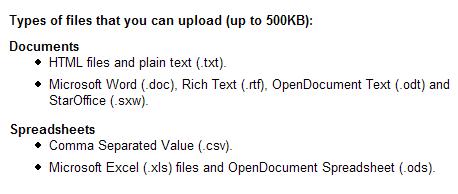
- Import various document (.htm, .doc, .txt, .rtf, .odt, .sxw) and spreadsheet (.csv, .xls, .ods) file formats into this service and publish them online instantly or save it to your hard drive in a different format. So if you want to convert a Microsoft Word file into Adobe PDF format, you can do it easily using this service.

- Collaborate and work with others on projects and set access permissions to files.

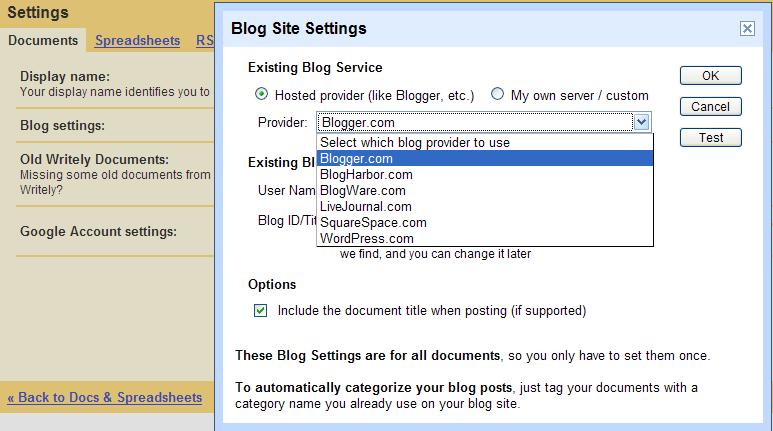
- Post to other blogging tools (other than Blogger) like wordpress, LiveJournal etc and also use with custom hosted sites.


To learn more about this service, you may visit this page.

Problems

1. Unable to Login to Blogger


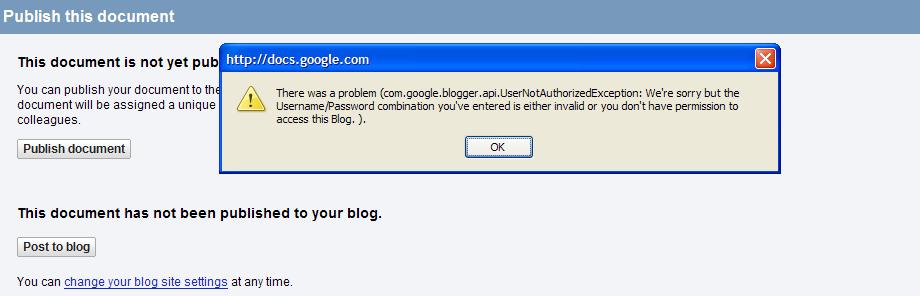
While editing my posts yesterday, I noticed that Blogger had even added a small side-box on the edit post pages to inform users of this service. That’s how I came to know about this service. However, when I used this service, it could not authenticate my blogger beta account (even after my providing the correct login credentials). I knew this was a bug and it was confirmed when in the evening, I noticed that the side-box no longer appeared on the edit post pages.


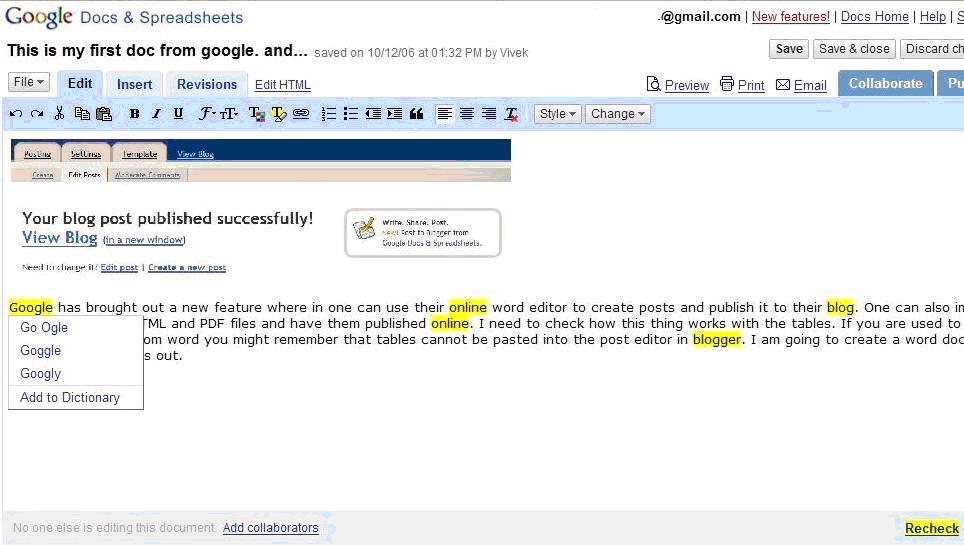
Once this service is ready for blogger beta, I need to check how this thing works with the tables. If you are used to copy-pasting text from Microsoft Word you might remember that tables cannot be pasted into the post editor in blogger.

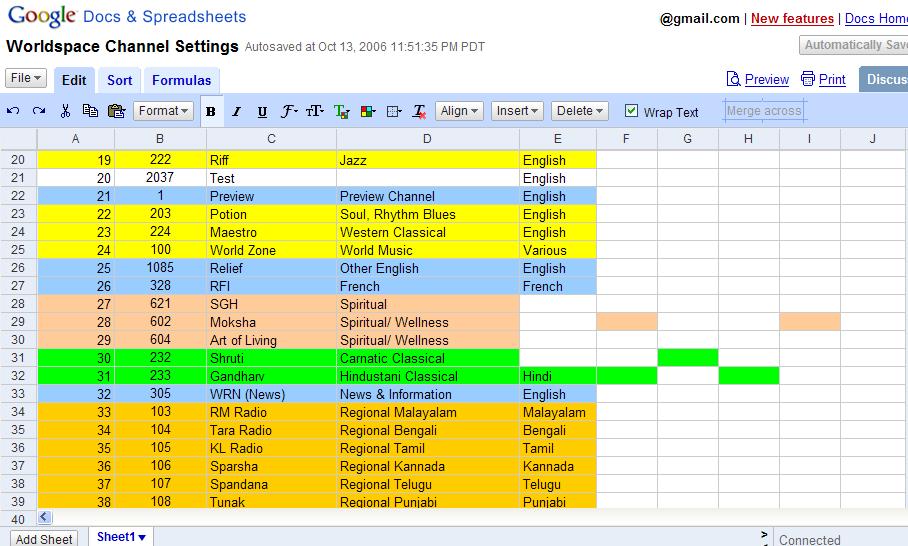
2. Formating issues with spreadsheets [Updated (14th Oct, 12:36)]


There are formatting issues with imported Excel files (as seen in the images above).

3. Issues with Spellcheck

I noticed that the spell check is not up to the mark:

Google needs to fix this problem at the earliest, because if any bloggers were to use this service, the bare-minimum they will look for is proper functioning of basic features like spell-check.

Support

Other than the usual support by Google, there is a Google help group for Google Docs & Spreadsheets, where you can post you questions, concerns and suggestions regarding this service and share your experiences with other users.

Conclusion

Google Docs & Spreadsheets is a powerful software/service but lots of errors and problems need to be ironed out before its ready for use (thats why its in beta stage). In a recent news article, I had read that Google's CEO Eric Schmidt wants his developers to focus on improving current software/services. I couldn't agree with him more. In the recent years, Google has brought out a range of powerful softwares and services from its labs but its the continuing improvement, feature additions and support for these services that will win the day for it.


Update (Nov 12, 2006 IST): It appears that the connectivity problems between Google Docs & Spreadsheets and Blogger Beta is now fixed. So go ahead try using this service now.

Saturday, September 16, 2006

Listen to your blog and blog podcasting

I have recently added a “Listen to this article” link in my post footer and a link to my podcast feed in my blog’s sidebar. Using the link in my post footer, you can listen to my articles by way of streaming mp3 audio. Isn’t that cool?

Yes. But how did you do that?

I was never into podcasting and had no clue about it. However, while browsing instabloke, I came across a link in its post footer which read “Listen to this post”. Through that link I found out about Talkr.

Talkr is a podcast server that’s very easy and free to use. To learn more about Talkr click here registering at Talkr, you can submit your blog’s RSS feed to them and the. Aftery will create a podcast feed with your posts converted into speech perhaps using some “text-to-speech” software at their end and it’s pretty fast too. So you don’t have to use podcast creation software, host the prepared MP3 files somewhere and setup a feed to it. Talkr will take care of it all. Talkr will also contain instructions on how to add the “Listen to this article” link and a Talkr chicklet to your blog. However, you may use the following piece of code for setting up the post footer links in your blogger beta blogs. (To learn more about working with post footers refer to my previous article

<a expr:href='"http://www.talkr.com/app/fetch.app?feed_id=
[Your Talkr Feed id]&amp;perma_link=" + data:post.url' target='_blank' title='Click to listen'>
Listen to this article</a>

However, I have also faced certain problems. For example, even after setting up the feed over a day ago I still don’t see all of my articles in my podcast feed. Pronunciation of certain words by the automated voice it not very good (I love it when she pronounces my name :D).

Moving on, once you have the podcast feed, you might want to use FeedBurner to dress it up i.e. optimize it and publicize it using chicklets and other features that they offer. To publicize you podcast further, just submit its feed link to podcast feed crawlers. A quick search for “submit podcast feed” in Google will bring up a number of such crawlers/ search engines. When submitting you podcast feeds to crawlers or blogging communities etc I prefer using a well dressed feed like feed burner’s and not the source podcast link because clicking on a feed burner feed link displays a page that your potential readers might like to go through unlike the code gibberish that they would see when they click on the source feed’s link.

Why podcasts?

Podcast is one of the few technologies that entered main-stream from obscurity in a very quick fashion. It’s in and people use it to keep a track of whatever they like. In addition, podcast feeds, promise a wider reach for an average blogger by way of supplying readers with downloadable audio file which they can store in their MP3 player and listen to anywhere or share with others. Such audio files may also be shared on P2P networks, BitTorrents and IRC thus giving you a wider reach. So isn’t that a reason enough?

Podcast feed reader

Well I am pretty new to this stuff but I think I have found a good feed reader for myself and it seems this one is pretty popular too. I am talking about Juice. Juice is a cross-platform podcast receiver which is available for free under the GPL open source. For more features of Juice, you may visit its website.

Click here to learn more about podcasts. If you find more examples of podcast servers (with text-to-speech ability) or a better podcast logo (see the subscribe section in the sidebar), please leave a comment about the same here. Thanks!

Saturday, August 26, 2006

Google Sketchup


Google does not stop fascinating me! Was checking out Google labs the other day, when I came across this software called Google Sketchup. It is a 3D-design software which is fairly powerful yet very simple and easy to use. And as usual (with Google) there is one version which is available for free.

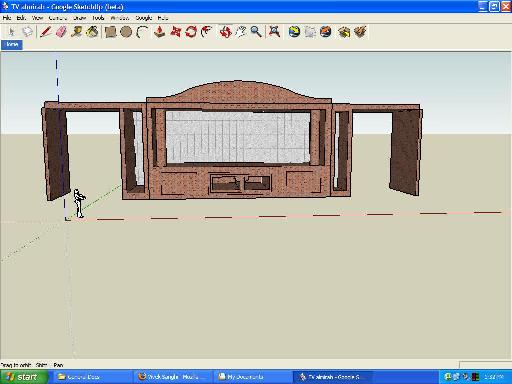
I downloaded the software and the tutorials were easy to follow. I finished them in a jiffy. As I had no 3D-idead to put on screen I just created a model of our television cupboard that we got recently done. Though the fine wood carvings cannot be reproduced in this software, what ever I could make of the cupboard was fairly good I guess.

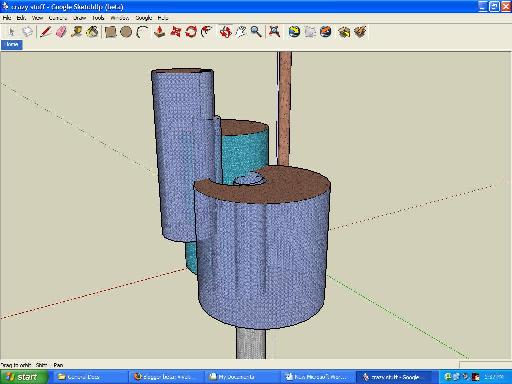
Other than that I also made a crazy skyscraper. Crazy coz every thing in it is round :-). I am sure it will be hell of a challenge for architects to created a skyscraper of that sort in real world ;-) For more about this software check out Google Sketchup

Other posts @ Stubborn Fanatic

Click here to view all my posts.

Creative Commons License
This work is licensed under a
Creative Commons Attribution-ShareAlike 2.5 License.

However, prior permission is required before you can display any content from this blog on your site. The author reserves the right to demand removal of such content at any time for any reason. (Not applicable for back-linking)
Note: The author is not responsible for any loss of data or damages to your homepage as a result of using the hacks suggested here. Please observe all necessary precautions while modifying template code.

© 2006 Vivek Sanghi a.k.a Stubborn-Fanatic